|
 |
 |
The user-defining view interface of the In-Sight vision system and camera images can be integrated with other HMI programs using the In-Sight ActiveX Display Control. This control can be easily deployed and configured in key HMI software packages such as Rockwell® RSView®, Invensys Wonderware® InTouch®, and Parker/CTC InteractX.
|
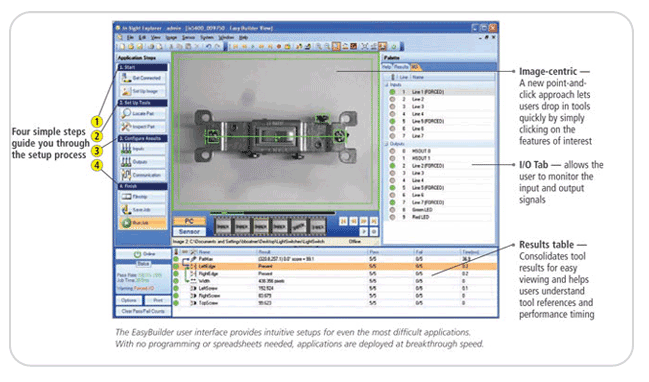
◆ Easy and simple to use
4 easy steps for complete installation starting from the part images.
1. Start
Search for the In-Sight vision system in the network, operate the vision system according to the guide, and configure the scale and/or non-linear calibration functions.
2. Tool set up
After finding the product, 22 vision tool libraries are available for inspecting the parts. Simply use the strongest vision tool that is available.
3. Configuration
The new point-and-click method allows you to choose which data to send. It is easy to choose a protocol to be used for communicating with the PLC, robots, or HMI in order to collect data and to store them.
4. Finish
Use the film strip controls for checking images, tables, and various color tool graphics in the building mode to solve any application problems and identify defective goods easily. Just these 4 steps are required for use the application. Generally, it reduces time in learning how to install the vision system and maximizes the productivity of the site by configuring and building the whole solution within a short period of time. |
| |
| |
|
|
| |
|
|